
Instagram is one of the most popular social media platforms for sharing photos, videos, stories, and creative content. Whether you are a content creator, business owner, influencer, or casual user, choosing the correct Instagram dimensions can make a significant difference in how your content looks. Proper image and video sizes help maintain visual quality, prevent unwanted cropping, and create a professional appearance across your profile.
Understanding Instagram dimensions is especially important for businesses and creators who want to build a recognizable brand and deliver a consistent experience to their audience. This guide explains the recommended image and video sizes for different Instagram formats, along with practical tips for creating high-quality content.
Why Instagram Dimensions Matter
Instagram displays content in several formats, including square posts, portrait images, landscape photos, Reels, Stories, and profile pictures. Each format has different proportions, so an image designed for one placement may not look right in another.
Using the appropriate dimensions offers several advantages. First, it helps your content appear clear and well-organized. Second, it reduces the risk of important details being cut off. Third, it allows you to use the available screen space effectively, particularly on mobile devices.
Correct dimensions also support a consistent visual identity. When your photos, videos, and graphics follow suitable proportions, your profile can look more organized and appealing to visitors.
Instagram Post Dimensions
Instagram supports different image shapes, giving users flexibility when publishing content. The best size depends on the type of post you want to share.
1. Square Instagram Posts
Square posts remain a popular choice for product photographs, promotional graphics, quotes, and simple announcements.
- Recommended dimensions: 1080 × 1080 pixels
- Aspect ratio: 1:1
- Suitable for: Product photos, graphics, and promotional content
Square images are easy to design and work well for maintaining a consistent grid. They are particularly useful when you want several posts to follow the same visual style.
For the best results, use high-quality images and avoid placing important text too close to the edges.
2. Portrait Instagram Posts
Portrait images occupy more vertical space on mobile screens than square posts. This makes them useful for tutorials, fashion photography, travel images, and informative graphics.
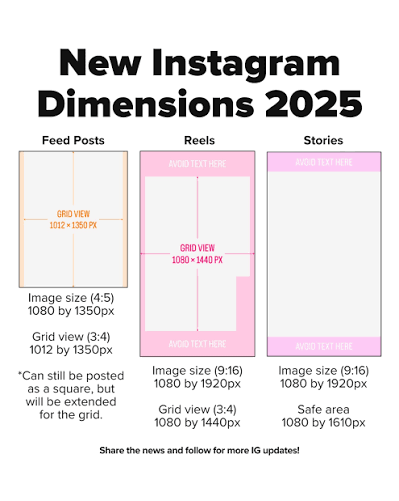
- Recommended dimensions: 1080 × 1350 pixels
- Aspect ratio: 4:5
- Suitable for: Portrait photography, educational graphics, and product showcases
Portrait posts can make your content more noticeable while users scroll through their feeds. However, ensure that the main subject and any text remain inside the visible frame.
3. Landscape Instagram Posts
Landscape images are ideal for wide photographs, group pictures, scenic views, and horizontal promotional designs.
- Recommended dimensions: 1080 × 566 pixels
- Aspect ratio: Approximately 1.91:1
- Suitable for: Landscapes, wide product images, and event photography
Although landscape posts are useful for certain types of content, they occupy less vertical screen space than portrait images. Choose this format when the composition benefits from a wider view.
Instagram Story Dimensions
Instagram Stories allow users to share photos, videos, announcements, and behind-the-scenes content that appears in a full-screen vertical format.
- Recommended dimensions: 1080 × 1920 pixels
- Aspect ratio: 9:16
- Suitable for: Daily updates, polls, announcements, promotions, and short videos
When designing Stories, keep essential text, logos, and interactive elements away from the very top and bottom of the screen. Instagram’s interface may cover these areas with account information, navigation controls, or reply options.
Use readable fonts, strong contrast, and simple layouts to make your Stories easy to understand. Short messages and clear calls to action can help viewers know what to do next.
Instagram Reels Dimensions
Reels are short-form videos that allow creators and businesses to share entertaining, educational, and promotional content.
- Recommended dimensions: 1080 × 1920 pixels
- Aspect ratio: 9:16
- Suitable for: Tutorials, product demonstrations, entertainment, and educational videos
For a professional result, record or edit videos in a vertical format. This helps your content fill the screen without unnecessary borders or awkward cropping.
It is also important to consider the placement of on-screen text. Keep captions and key visual elements away from the edges, especially where Instagram displays buttons, descriptions, and account details.
Use clear lighting, readable subtitles, and an engaging opening to communicate your message effectively. Good dimensions improve presentation, but the video’s usefulness and creative quality remain essential.
Instagram Profile Picture Dimensions
Your profile picture helps people recognize your account in search results, comments, and other areas of Instagram.
- Recommended upload size: 320 × 320 pixels or larger
- Aspect ratio: 1:1
- Suitable for: Personal photographs, business logos, and creator branding
Instagram displays profile pictures in a circular shape. Therefore, an image that looks good as a square may lose important details when displayed in a circle.
Place your face, logo, or main symbol near the center. Avoid small text and complicated designs that become difficult to recognize at reduced sizes.
Businesses should consider using a clear logo, while individual creators may prefer a recognizable portrait.
Instagram Carousel Dimensions
Carousel posts allow users to combine multiple images or videos into a single publication. They are useful for step-by-step tutorials, product collections, educational content, and storytelling.
A practical image size for portrait carousels is 1080 × 1350 pixels, with a 4:5 aspect ratio. Square carousels can use 1080 × 1080 pixels.
For a polished carousel, maintain the same aspect ratio throughout the slides. Mixing different image shapes may cause some content to appear cropped or inconsistent.
You can also create a visual connection between slides by using consistent colors, fonts, headings, and layouts. Each slide should communicate one main idea while encouraging viewers to continue through the sequence.
Instagram Video Dimensions and Quality
Instagram supports video content in several placements, including Reels, Stories, and feed posts. The most appropriate dimensions depend on where the video will appear.
Vertical videos measuring 1080 × 1920 pixels are a practical choice for Reels and Stories. Feed videos should be prepared according to the intended aspect ratio and placement.
For better video quality, consider these recommendations:
- Export videos at 1080 pixels wide when appropriate for the selected format.
- Use a supported video format, such as MP4.
- Keep text and important subjects away from interface overlays.
- Preview your video on a mobile screen before publishing.
- Avoid repeatedly exporting the same file, as this may reduce quality.
Instagram may compress uploaded media, so starting with a high-quality original file is helpful. Remember that supported formats, file limits, and publishing options can change over time.
Tips for Choosing the Right Instagram Dimensions
Selecting the correct dimensions becomes easier when you plan your content before designing it.
Start With the Intended Placement
Decide whether your content will be a feed post, Story, Reel, carousel, or profile picture. Set the canvas size before adding images and text. This reduces the need to resize or redesign the content later.
Use High-Resolution Images
Low-resolution images may appear blurry, especially when viewed on larger screens. Whenever possible, use clear original photographs and graphics that meet the recommended dimensions.
Keep Important Elements Centered
Text, logos, faces, and product details should remain within the visible area. This is particularly important for profile pictures, Reels, Stories, and content that may be previewed in different layouts.
Preview Before Publishing
Always review the final design before uploading it. Check whether text is readable, images are properly aligned, and essential information remains visible.
Maintain Consistent Branding
Choose a consistent color palette, typography, and design style for your Instagram content. Consistency helps audiences recognize your posts and creates a more professional profile.
Common Instagram Dimension Mistakes to Avoid
One common mistake is using the same image size for every type of content. A square image may work well in the feed but may not fill a vertical Story or Reel properly.
Another mistake is placing text too close to the edges. Important information can become difficult to read or may be covered by Instagram’s interface.
Uploading small, blurry images is also a problem. Starting with a suitable resolution and checking the exported file can help preserve clarity.
Finally, do not assume that correct dimensions automatically guarantee engagement. Attractive design, useful information, relevant topics, and audience interaction are equally important parts of an effective Instagram strategy.
Conclusion
Understanding Instagram dimensions is an important step toward creating attractive and professional social media content. From square feed posts and portrait images to full-screen Reels and Stories, every format benefits from the right image size and aspect ratio.
As a general starting point, use 1080 × 1080 pixels for square posts, 1080 × 1350 pixels for portrait posts, and 1080 × 1920 pixels for Stories and Reels. Choose profile picture dimensions that preserve important details when displayed in a circle, and maintain consistent proportions across carousel slides.
By planning your designs carefully, using high-quality files, and previewing content before publishing, you can create a more polished Instagram presence. Keep in mind that platform specifications may change, so checking Instagram’s current publishing guidance is a good practice when preparing content for professional use.